Skip to content

Mike Williams Club - The Blog

Weirder words were never written!

How to Turn Off Animated GIFS in MacOS Sonoma

It is the one thing that drives me bonkers. I don’t like moving things in my iMessage window but I also don’t want to delete the entire conversation to get rid of it.

Go into system settings and Go to Accessibility and then Display..
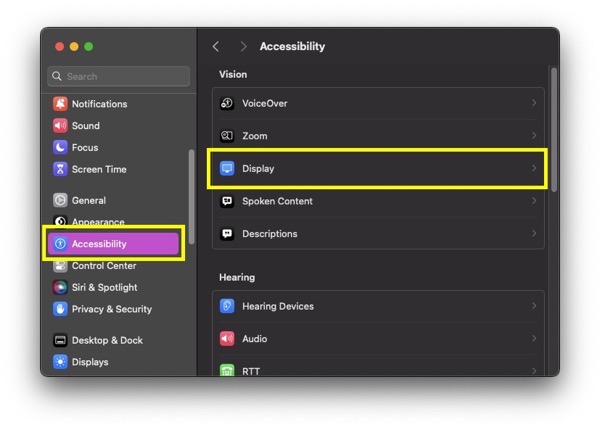
Screenshot 2023 06 06 at 7 09 29 AM

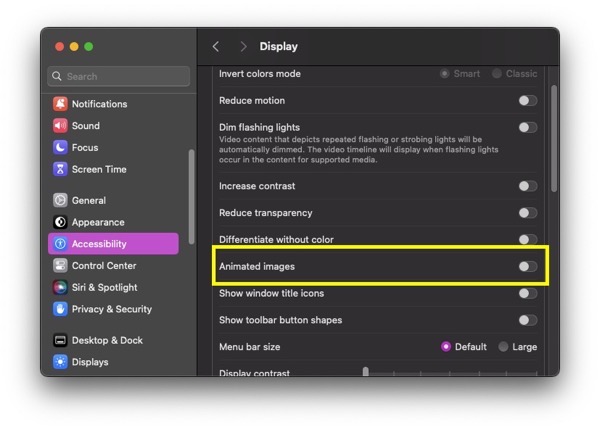
…and toggle off Animated Images.

Screenshot 2023 06 06 at 7 11 11 AM

This worked for me.

Tags: applegifsonoma

Share
June 6, 2023 by Mike Williams Apple MacOS Sonoma

You may also like...

  • Fashion Fail

    Fashion Fail

  • Vacation 2017 – July 2, 2017

    Vacation 2017 – July 2, 2017

  • The Next Big Thing

    The Next Big Thing

  • Next Cats
  • Previous XKCD – Ruling Things Out

Reading

Currently Reading
The Infinite Extent: The Bobiverse Book 6
Series: Bobiverse
Author: Dennis E. Taylor

Southern Weather

Georgia
☀️
61°F
Clear sky
Feels like 60°F
Atlanta, Georgia

Mike’s Pages

  • Abandoned Book Series
  • About Mike
  • Privacy Policy

Blog Site Options

  • Log in
  • Entries feed
  • Comments feed
  • WordPress.org

Tribute to Irv

OLYMPUS DIGITAL CAMERA

OLYMPUS DIGITAL CAMERA

OLYMPUS DIGITAL CAMERA

OLYMPUS DIGITAL CAMERA

OLYMPUS DIGITAL CAMERA


OLYMPUS DIGITAL CAMERA

OLYMPUS DIGITAL CAMERA

OLYMPUS DIGITAL CAMERA

OLYMPUS DIGITAL CAMERA

OLYMPUS DIGITAL CAMERA

OLYMPUS DIGITAL CAMERA

Mike Williams Club – The Blog © 2026. All Rights Reserved.

Powered by WordPress. Theme by Alx.