apple

Daily Tech History: August 28, 2009 — Mac OS X Snow Leopard Ships

A snow leopard, the namesake of Apple's Mac OS X 10.6 release

On August 28, 2009, Apple released Mac OS X 10.6, better known as Snow Leopard — an operating system update that broke from the usual Apple playbook. Instead of piling on flashy new features, Apple spent the release cycle refining what was already there, reworking more than 90% of the system’s underlying projects for speed, stability, and efficiency. It shipped for just $29, a bargain even by 2009 standards, and it actually shrank the OS footprint, freeing up to 7GB of disk space on most Macs.

Snow Leopard mattered more than its modest price tag suggested. It was the first Mac OS to drop support for older PowerPC-based Macs entirely, committing fully to Intel processors, and it quietly retired AppleTalk, the pioneering networking protocol that had connected Macs since the 1980s. Under the hood, Apple introduced Grand Central Dispatch to make better use of multicore processors and added OpenCL to offload graphics-style computing to the GPU — both technologies that shaped how Mac software was built for years afterward. It was also the first desktop OS with built-in Microsoft Exchange support, letting Mac users handle corporate email, calendars, and contacts natively for the first time.

Also born on this day: Elon Musk, the entrepreneur behind Tesla and SpaceX, was born on August 28, 1971 — a reminder that this date has more than one entry in tech’s timeline.

Source: Apple Newsroom, This Day in Tech History

Daily Tech History is a running series looking back at notable moments in technology on this date.

Daily Tech History: August 23, 2002 — Mac OS X “Jaguar” Prowls Onto the Scene

Close-up of a jaguar's distinctive spotted fur, evoking Apple's Mac OS X 10.2 "Jaguar" release

On August 23, 2002, Apple released Mac OS X 10.2, nicknamed “Jaguar,” and it’s widely regarded as the release where Mac OS X finally grew up. The first two versions of OS X (10.0 and 10.1) had been rough, transitional efforts still leaning on habits from the old Mac OS 9 era. Jaguar was different: Steve Jobs and Apple treated it less like a patch and more like a proper product launch, throwing midnight kickoff events at all 35 Apple retail stores, complete with giveaways and in-store demos, for a single-user copy priced at $129 (or $199 for a five-computer Family Pack).

What made Jaguar matter wasn’t just the polish — it was the sheer volume of stuff packed in, over 150 new features and apps by Apple’s own count. iChat brought AIM-compatible instant messaging to the Mac, Sherlock 3 turned into an early web-services aggregator, Inkwell added handwriting recognition, and Rendezvous (later renamed Bonjour) let Macs and compatible devices find each other on a network automatically. It was also the first OS X release where Apple used the big-cat code name in its actual marketing, kicking off a naming tradition — Panther, Tiger, Leopard, and beyond — that stuck around for the next decade. Fittingly, Jaguar also quietly retired the old “Happy Mac” startup icon in favor of the plain gray Apple logo still used today.

Also worth noting: Jaguar’s midnight launch is often cited as one of the earliest examples of Apple treating a software release like an event — a playbook the company would later perfect for iPhones and other hardware launches.

Source: This Day in Tech History, Apple Newsroom

Daily Tech History is a running series looking back at notable moments in technology on this date.

Live Photos

Rant mode on.

This drives me bonkers.

On iOS, if you have LIVE photos turned on your camera won’t make a sound when you press the shutter.

I like and need sound, especially if I am using the timer.

I’m usually not using LIVE photos so every once in a while it gets turned on by accident and then it takes me a few minutes to figure out why.

Rant mode off.

Apple’s link to the topic here.

Ulysses the App

Look at this window.

Screenshot 2023 10 14 at 7 54 12 AM

There is a glaring issue with it. It is missing the maximize, minimize or whateverize the window should have. Meaning that the only way I can get rid of it is to hide it.

I don’t like “hiding” things. Minimize should be available for this type of window.

Ok. Enough venting.

Why I Love Home Brew

Home Brew is probably not what you think it is.

It is a command line tool for MacOS that fills in a lot of small but missing pieces. Things like PHP no longer come bundled with MacOS so Home Brew is how you get that done now. I could site many more examples but I think you get the idea.

The Home Brew developers are amazing. They have also seen many Apple release cycles. I find the following funny.

Screenshot 2023 06 28 at 3 55 47 PM

It is funny because they have to say the words.

How to Turn Off Animated GIFS in MacOS Sonoma

It is the one thing that drives me bonkers. I don’t like moving things in my iMessage window but I also don’t want to delete the entire conversation to get rid of it.

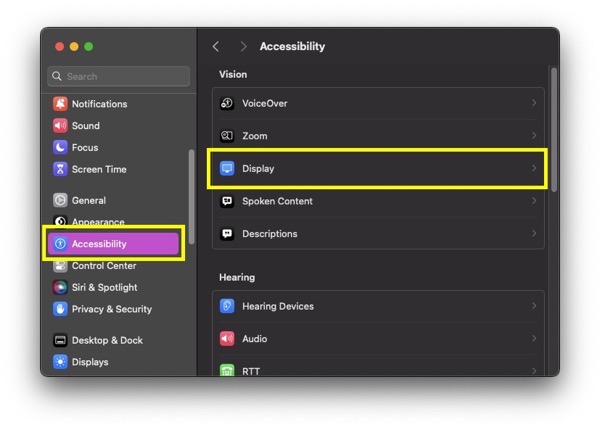
Go into system settings and Go to Accessibility and then Display..

Screenshot 2023 06 06 at 7 09 29 AM

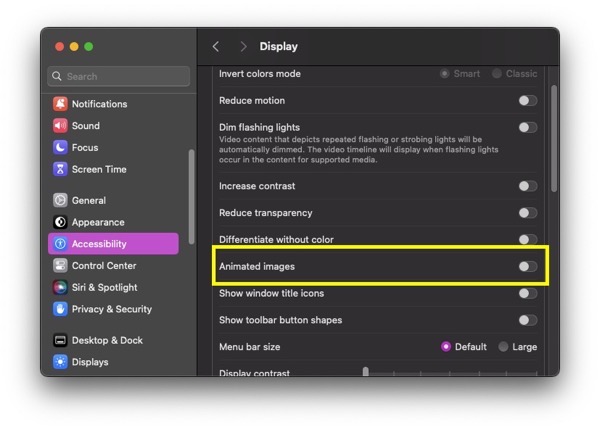
…and toggle off Animated Images.

Screenshot 2023 06 06 at 7 11 11 AM

This worked for me.

Weird Apple Issues

I just got an update from Apple that seems a bit strange. There is one major problem.

– The update took my devices OUT of a development cycle. I had to flip switches to put them back in. If I wouldn’t have been paying attention, that could’ve been a big deal.

I pay to be in the Apple Developer environment. Why they would make a switch for it and then opt out the developers by default is weird.

Ok. Weird Apple rant over.

Apple Magic Keyboard

The Apple Magic Keyboard has been out for a while now. Today, I finally got one of them. I’m typing this post on it. I have to say that this iPad experience is much different than my first generation iPad Pro.

The typing is great. The keyboard doesn’t feel cheap and so far, I am loving it.

The downside of this keyboard is the price. It is expensive at $350.00. Is it worth it? I plan on typing up a couple of stories on it so we’ll see.

So far, daddy likes.

Why I turned off Private Relay

Apple’s new feature that hides your IP address is an awesome concept. Using any map function and seeing the various places that your phone is reporting your location as…is cool.

What is NOT cool is the fact that private relay prevents websites from loading.

Not cool.

For me, a great example is Slashdot.

If I try to bring it up in my phone and can’t, it is almost always because private relay is turned on. I turn it off and the website loads as normal.

Mac OS 9 To-Go

This is from 9TO5 Mac and is extremely cool. I appreciate the effort that went into creating these. I would not have been able to afford them, but back then I couldn’t afford most Apple products.

I started off imagining what iOS would look like in classic Mac OS style. I kicked things off stylizing iOS with the platinum design and ultimately decided to meld it with classic Mac OS user interface elements. The project became a mobile version of Mac OS 9 otherwise known by its codename, Sonata. I chose to call the software “Mac OS 9 To-Go” and wanted to see what it would look like on a 90s PDA/smartphone. It led to the first product, the Newton Phone.

The rest of the article is here.